
User's Manual
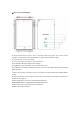



Table Of Contents
- Quick Start Guide
- Introduction
- Contents
- ↑替换
- Can Sleep/Shut down/Restart the Tablet PC
- Can let you search the files and application programs in the Tablet PC.
- Can let you set up the Table PC.
- Can scan more apps
- Search menu
- IV. Basic Operations
- This equipment has been tested and found to comply with the limits for a Class B digital device, pursuant to Part 15 of the FCC Rules. These limits are designed to provide reasonable protection against harmful interference in a residential installatio...
- -- Reorient or relocate the receiving antenna.
- -- Increase the separation between the equipment and receiver.
- -- Connect the equipment into an outlet on a circuit different from that to which the receiver is connected.
- -- Consult the dealer or an experienced radio/TV technician for help.
- This device complies with part 15 of the FCC Rules. Operation is subject to the following two conditions:
- (1) This device may not cause harmful interference, and (2) this device must accept any interference received, including interference that may cause undesired operation.
- Changes or modifications not expressly approved by the party responsible for compliance could void the user's authority to operate the equipment.

Ⅱ.Key Layout and Definitions
○
1
E
A Power button: Press it down to start or close the touch screen panel. You can also let the
computer to enter dormancy through this button or wake from the dormancy mode.
A○
2
E
A Sound-/sound+: Lower/raise volume
A○
3
E
A Front CCD camera: take photos, and record pictures
A○
4
E
A DC Indicator: Becomes brighter when charging.
A○
5
E
A Windows key: Press this button to return to the Start screen.
A○
6
E
A Loudspeaker: The built-in loudspeaker enables you to hear the sound without having to linking
additional device
A○
7
E
A Micro SD card slot: The built-in storage card reader slot supports MicroSD and MicroSDHC
format.
A○
8
E
A Socket for earphone and microphone: This socket can transmit the audio signals of Tablet PC to
loudspeaker or earphone.
A○
9
E
A Micro USB Interface: You can read the data through USB.
A○
10
E
A Mini HDMI Interface: High-Definition Multimedia Interface.
A○
11
E
A Back CCD camera: take photos, and record pictures.
A○
12
E
A MIC:Microphone Interface.