
User's Manual

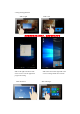
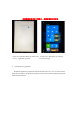


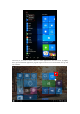
Table Of Contents
- Quick Start Guide
- Introduction
- Contents
- ↑替换
- Can Sleep/Shut down/Restart the Tablet PC
- Can let you search the files and application programs in the Tablet PC.
- Can let you set up the Table PC.
- Can scan more apps
- Search menu
- IV. Basic Operations
- This equipment has been tested and found to comply with the limits for a Class B digital device, pursuant to Part 15 of the FCC Rules. These limits are designed to provide reasonable protection against harmful interference in a residential installatio...
- -- Reorient or relocate the receiving antenna.
- -- Increase the separation between the equipment and receiver.
- -- Connect the equipment into an outlet on a circuit different from that to which the receiver is connected.
- -- Consult the dealer or an experienced radio/TV technician for help.
- This device complies with part 15 of the FCC Rules. Operation is subject to the following two conditions:
- (1) This device may not cause harmful interference, and (2) this device must accept any interference received, including interference that may cause undesired operation.
- Changes or modifications not expressly approved by the party responsible for compliance could void the user's authority to operate the equipment.

Ⅲ. Introduction to Desktop
1. Windows 10 start image: On the start screen, you can see many programs fixed in the
image. These application programs are displayed in the form of “magnet”. As long as you click
them, you can easily visit them.
You need to log on your Microsoft account before the application program completely runs.
↑替换