
User's Manual


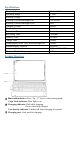

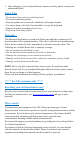


Pairing Steps
Step 1. Switch ON/OFF to ON, the power indicator will turn on for 3s.
Step 2. Press the “Fn + C” keys together to enter pairing mode.
The blue Bluetooth indicator will start to rapidly flash.
Step 3. On the iPad, select Settings - Bluetooth - On.
Step 4. The iPad will display “Fintie EB328” as an available device.
Step 5. Select “Fintie EB328” on the iPad. The indicator will turn off after
successfully paired.
Note:
1. Only one device can be actively paired at one time.
2. After pairing for the first time, your device will connect to the keyboard
automatically when opening the keyboard.
3. In case of connection failure, delete the pairing record from your device, and try
the above procedures again.
Keyboard Backlight Guide
1. Backlight ON/OFF Key.
1
st
Press
Turn the light on
2
nd
Press
Increase the brightness
3
rd
Press
Increase the brightness to maximum
4
th
Press
Turn the light off
2. Press + to change the backlight colors.
Fn + A
Change the backlight color of left zone
Fn + S
Change the backlight color of central area
Fn + D
Change the backlight color of right zone
3.When the battery is less than 20%, the backlight will turn off.
4. The backlight won't work until the keyboard is paired with your tablet.
Sleep Mode
The keyboard will enter sleep mode after being idle for 30 minutes.
To activate it, press any key and wait for 3 seconds.
Charging Your Keyboard
1.Plug the Type-C end of the charging cable into the keyboard and the other USB
end into your preferred USB charger. (USB charger is not included.)
2.When charging, the power indicator will turn red. Generally, it takes
approximately 4 hours for a full charge. (Output: DC 5 V/500 mA.)
Package Contents
1 x Fintie Bluetooth Keyboard Case
1 x Charging Cable
1 x User Manual