
User's Manual




Keys and Function
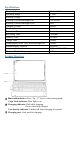
Tip: Press Fn key and hot key together to activate action.
Home
Brightness -
Brightness +
Keyboard
display
Screenshot
Search for
Previous track
Play/Pause
Next track
Mute
Volume -
Volume +
Lock screen
Power
Display
+A
Select all
+C
Copy
+V
Paste
Backlight
on/off
Touchpad Function
Gesture
Finger action
picture
Function
1-finger tap
Mouse left button
1-finger slide
Move the cursor
1-finger double-click and
hold
Left button select the
target to drag
2-fingers tap
Assistive Touch
2-fingers vertical/horizontal
movement
Mouse wheel
3-fingers slide up
Back to desktop
3-fingers slide to the left
Switch Active window
3-fingers slide to the right
Switch Active window
Trouble Shooting
If your device doesn’t respond to the keyboard, try the following steps.
1. Restart your device.
2. Turn your keyboard off and back on.
3. Forget and re-pair your keyboard.
4. If your keyboard doesn’t establish or maintain a Bluetooth connection, reset
the Bluetooth module by charging your keyboard.