
User's Manual


Notes:
When the external BT Device searched the unit, our model number “MBH530”
will appear on the display of external BT Device.
If while pairing you are asked for a code please try "0000" or "1234".
Normal operation after pairing:
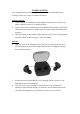
1. Power on the R (or L) Earbud by pressing the Button on it.
If R Earbud is using, the Red & Blue Indicators on it will illuminate and
blink.
If L Earbud is using, the Red & Blue Indicators on it will illuminate and
blink.
2. Power on the external BT Device and enter to BT searching mode. Wait a few
seconds until the Earbud automatically paired to the external BT Device. Then:
If R Earbud is using, the Red Indicator on it will turn off.
If L Earbud is using, the Red Indicator on it will turn off.
3. After pairing is complete you may now play music and answer calls with your
external BT Device.