
User's Guide
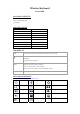

PAIRING STEP
Step 1. Turn on the keyboard’s power button .
The blue status light will be on for 4 seconds and then be off.
Step 2. Press the connect button, the Bluetooth indicator will be blinking blue.
Step 3. Go to your tablet’s “Settings” - “Bluetooth”,flip the switch to the “on” position.
It will automatically search available Bluetooth devices in the vicinity.
Step 4.When you find the device “
Bluetooth 3.0 Keyboard”, click Pair.
SPECIAL NOTE
1. Only one device can be actively paired at one time.
2. For other Bluetooth enabled device,please verify the bluetooth Standard&compatibility before
attempting to connectto the keyboard.
2. After pairing for the first time, your device will connect to the keyboard automatically when opening
the keyboard.
3. In case of connect failure, delete the pairing record from your device, and try the above procedures
again.
POWER SAVING MODE
The keyboard will enter sleep mode after being idle for 30 minutes.
To activate it, press any key and wait for 3 seconds.
HOW TO CHARGE IT
1. Use the included USB cable for charging. Connect one end to a USB charger,
and the other to the keyboard.
2. In charging, the power indicator will turn red. Generally, it takes approximately
2 hours for a full charge.(Charging adapter is not included)
TROUBLESHOOTING
If you are unable to connect the keyboard to your tablet, please try the following:
1. Starting with a full charge on both devices ensures that process won’t be interrupted by a low battery.
2. Check your tablet’s Bluetooth is on.
3. Make sure that the keyboard is within the effective operation distance of 33 feet (10 M).
SAFETY INSTRUCTIONS
1. Keep the keyboard away from sharp objects that could damage it.
2. Do not put heavy objects on the keyboard.
3. Do not stretch, twist or apply force to the keyboard.
4. To clean the keyboard, gently wipe it by using a moist cotton cloth.
5. Please do not spill coffee, tea or other liquids on the keyboard.