
Safety Instructions

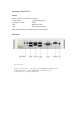


Table Of Contents

Connections
Internet connection
The computer can be connected to a local area network (LAN) via a network cable. Just plug
the network cable into the network port on the back panel of your computer.
Once connected to the network, you can access other computers on the network. You may
be able to store and retrieve information, use a network printer, a modem, email, or connect
to the Internet. You can also share files or create a small network between two computers.
Use a pair of shielded Category 5 (shielded Cat 5) Ethernet cables to connect to a 10 Base-T,
100Base-T or 1000Base-T Ethernet network. The Ethernet port on the Extreme BOX
automatically detects the connected Ethernet device.
Connecting Media devices
Multimedia devices such as microphones, headphones, external speakers and audio input
devices can be connected. You can use the multimedia features of your computer after
installing these devices.
Install the devices by steps below:
·Microphone: Insert the microphone insertion jack (pink socket) located on the front and
rear panels of the computer
· The headset is plugged into the headphone jack located on the front panel of the
computer.