
Safety Instructions



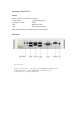


Table Of Contents

conditioning equipment.
• Avoid placing it in dusty, high (or too low) temperature and humid places.
• Place your computer near your desk or under the desk as long as it does not interfere with the
space required for work and activities.
Place the monitor
Install the monitor in a comfortable viewing position, usually at a distance of 50-60
cm. Adjust the display so that the top of the screen is level with the eye or slightly
below the eye.
Place the keyboard
The placement of the keyboard is an important factor affecting the sitting posture. Being
placed too far will tilt the body forward and create an unnatural sitting position. Being placed
too high will make the shoulder muscles more tense.
· The keyboard should be placed slightly above the knee. Fold the folding frame at the
bottom of the keyboard to adjust the keyboard height.
·While typing, keep your forearms parallel to the ground, your upper arms and shoulders
should be relaxed, then try tapping the keyboard for input. If you feel a tight shoulder or
neck, stop and check your sitting position.
Place the keyboard in front of the keyboard. Because if the keyboard is placed next to the
monitor, you must twist your head when typing, which will make your neck muscles more
tense.
Place the mouse
·The mouse should be placed on the same plane as the keyboard for convenience.
·Adjust the mouse position to ensure full movement without stretching or leaning.
·Move the mouse with your arm. Do not lean your wrist against the table while moving the
mouse.
Connect mouse and keyboard
Connect the mouse or keyboard into any USB port on the rear panel.