
Operation Manual






3、How to Connect Camera Add Device
3.1 Register an account
⚫ When you use this app at the first time, you need to use your email to register an
account, click"Sign Up”and set a password according this procedure,or choose Long in
with mobile phone mumber.
⚫ If you forget your password, you can reset your password, just click "Forgot password”
on the login page.
⚫ Password should be at least 6 characters and not longer than 26 characters,It should be
a combination of letters and numbers.
Only support mobile phone number registration in some regions.
Please use email to register in other areas.
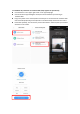
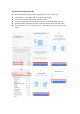
3.2 Connect the camera
Note: Camera only supports 5G WIFI before adding devices, make sure your router is 5G WIFI,
and your phone is connected to 5G Wi-Fi.