
Operation Manual




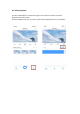


3.2.3 Addition of AP hotspot
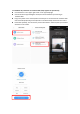
⚫ Click the button in the upper right comer on the app homepage.
⚫ Choose the Addition of AP hotspot,Plug in the power to the camera,Wait patienty for
the device light to blink or hear a tone,Click Next when done.
⚫ If you don’t see any tips,try resetting your device,Find the reset button,Long press for at
least 5s,click next after prompted.
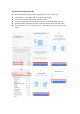
⚫ please go to the Wi-Fi list and connect the Wi-Fi in the blue field “CLOUDCAM_XXXX”
Select the Wi-Fi that matches the prefix and connect Return to APP after successful
connection.
⚫ After connecting the device successfully click next,Choose your router Wi-Fi,Enter Wi-Fi
password,Click confirm,Addition is successful,then your can preview the screen.