
User guide
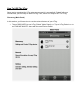
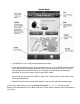
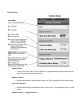
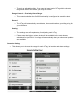
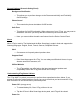

FindMyiPhone/iPad
MildAlert
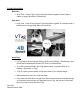
➢ ShortPushPressVTagConnect&FunctionButtontogether,whileinpaired
status,totriggerMildAlertiniPhone/iPad.
HighAlert
➢ LongPushPressVTagConnect&FunctionButtontogether4+seconds,whilein
pairedstatus,totriggerHighAlertiniPhone/iPad.
Notes/Tips:
➢ IfVTagcannotbefoundbytheiPhone,pleasetouch[Setting>Bluetooth]onyour
iPhoneandturnBluetoothONandOFFoncetoresetBluetooth.
➢ TorePair(connect)iPhoneandVTag,pleaseselect“ForgetthisDevice”on
[Setting>Bluetooth>VTag].
➢ VTagisagreat,greatinventiontohelpkeeptrackofyourfavoritethings!
➢ Whendistractionsoccur,theVTagcanhelp!
➢ Ifyouhavequestionsand/orsuggestionsSherlockHonescanbereachedthrough
yourAmazonaccountwhereyoupurchasedyourVTag.Weareheretohelpand
wishyoumuchsuccesswithyourVTag.
Sincerely,
SherlockHonesSH®