
User guide
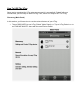
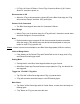

GeneralSettings(ScenarioSettingPanel)
BackgroundNotification
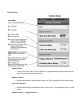
➢ ThisallowsyoutoperformchangestotheDisconnectedNotifyandFindNotify
On/Offsettings.
PhoneSound
➢ Thiscontrolsthephonealert/alarmOn/Offfunction.
SafeZone
➢ ThisallowsforOn/Offfunctionality.WhenusingoneofyourVTags,youmaywantto
establishasafezone(noalerts)andthisfunctionmaybeturnedonhere.
➢ Note:youcannotutilizethesafezonefeaturefromtheDeviceControlPanel.
About
WhileVTagismadeinTheNetherlandstheBlueSmartAppismadeinAsiaandsupportsthe
followinglanguages:English,Dutch,French,German,SimplifiedChinese.
Q&A
➢ Getanswerstofrequentlyaskedquestionshere.
SupportEmail
➢ BlueSmartAppsupportforVTag.YoucanalwaysaskSherlockHonesviayour
Amazonaccountforanswers,too!
OfficialWebsite
➢ TheVTagwebsitecanofferhelponthelatestandgreatestupdatesand
compatibilityissueswithVTag,BlueSmartandVTrump.
UnderstandingVTagStatus&Alerts
TheVTagMUSTbepaired(connected)toperformtheseoperationalactions,below.Ifyou
attempttoutilizetheactionsandhaveissues,besuretocheckthatyouhaveturnedtheVTag
backonandareinthePairedStatus(connected)mode.
PowerOff(energysaver)
➢ Toextendbatterylife,CloseVTag,whilenotinuse.
➢ TaptheOfficoninBlueSmartAppdevicepanel,andVTagwillbeclosed.
PowerOn