
Owner's Manual
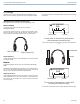
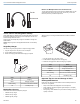


Table Of Contents
- PSM300 User Guide
- PSM300 Stereo Personal Monitor System Online User Guide
- Table of Contents
- PSM300Stereo Personal Monitor System
- Important Product Information
- PSM®300
- PSM®300
- Hardware
- System Applications
- System Setup and Configuration
- Operation
- Troubleshooting
- Specifications
- RF Carrier Range
- Compatible Frequencies
- Tuning Bandwidth
- Operating Range
- Audio Frequency Response
- Signal-To-Noise Ratio
- Total Harmonic Distortion
- Companding
- Spurious Rejection
- Latency
- Frequency Stability
- MPX Pilot Tone
- Modulation
- Operating Temperature
- RF Output Power
- RF Output Impedance
- Net Weight
- Dimensions
- Power Requirement
- Audio Input
- Connector Type
- Polarity
- Configuration
- Impedance
- Nominal Input Level
- Maximum Input Level
- Pin Assignments
- Phantom Power Protection
- Audio Output
- Connector Type
- Configuration
- Impedance
- Active RF Sensitivity
- Image Rejection
- Adjacent Channel Rejection
- Intermodulation Attenuation
- Blocking
- Audio Output Power
- Minimum Load Impedance
- Headphone Output
- Output Impedance
- Net Weight
- Dimensions
- Battery Life
- Frequency Range and Transmitter Output Power
- Optional Accessories and Replacement Parts
- Certifications
- PSM®300 Personal Monitor Wireless System Frequency Supplement
- PSM300 Personal Monitor System Product Info
- P3RA User Guide
- P3RA Professional Bodypack Receiver Safety Information
- SE215 Manual
- Rack Mount Hardware Kit Instruction Sheet
- AA Battery Insertion for Bodybacks
- A Quick Guide to Personal Monitor Systems
- Warranty
- Safety Precautions

Instruments
Vocals
Balance and Mix Adjustments from the Home Screen
To make quick adjustments to the stereo balance or MixMode blend, use the
arrow buttons (▲▼) while in the home screen. If necessary, use the lock
feature to prevent any accidental adjustments.
Shure SB900 Rechargeable Battery
Shure SB900 lithium-ion batteries offer a rechargeable option for powering
the bodypack. Batteries quickly charge to 50% capacity in one hour and
reach full charge within three hours.
Single chargers and multiple bay chargers are available to recharge the
Shure batteries.
Caution: Only charge Shure rechargeable batteries with a Shure battery
charger.
Single Bay Charger
The SBC-100 single bay charger offers a compact charging solution.
1. Plug the charger into an AC power source or USB port.
2. Insert a battery into the charging bay.
3. Monitor the charging status LEDs until charging is complete.
LED
StatusColor
ChargingRed
Charging CompleteGreen
Fault: check connections and batteryAmber Flashing
No battery in bayOff
Multiple Bay Chargers
Shure offers three models of multiple bay chargers:
• SBC200 two bay charger
• SBC210 two bay charger
• SBC800 eight bay charger
SBC200 chargers can charge individual batteries or batteries installed in
bodypacks.
1. Plug the charger into an AC power source.
2. Insert batteries or bodypacks into the charging bay.
3. Monitor the charging status LEDs until charging is complete.
StatusColor
Charging CompleteGreen
Charge level above 90%Green/Red
ChargingRed
Fault: check connections and batteryAmber Flashing
No battery in bayOff
Important Tips for Care and Storage of Shure
Rechargeable Batteries
Proper care and storage of Shure batteries results in reliable performance
and ensures a long lifetime.
• Always store batteries and bodypacks at room temperature
• Ideally, batteries should be charged to approximately 40% of capacity
for long-term storage
• During storage, check batteries every 6 months and recharge to 40% of
capacity as needed
Shure IncorporatedP3RA Professional Wireless Bodypack Receiver
5/72017/10/30