
- C384FA-M OPERATING MANUAL

Colour monitor C384FA-M
8 - English A26361-K826-Z100-2-5E19
Connecting cables to the monitor
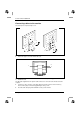
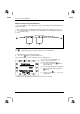
The monitor ports are protected by a cover.
Ê Remove the rear monitor cover (1).
Ê Remove the upper cover of the monitor base (2).
1
2
3
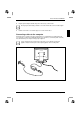
DC- IN 1 2V
1 = D-SUB connector
2 = AUDIO IN socket
3 = Socket for power supply
The data cable supplied has two 15-pin D-SUB connectors for connection to the monitor and to the
computer.
Ê Connect one of the connectors of the data cable to the D-SUB connector on the monitor (1)
and secure the plug-in connection by tightening the safety screws.
Ê Insert the audio cable plug in the AUDIO IN socket (2) of the monitor.