
- C384FA-M OPERATING MANUAL

Colour monitor C384FA-M
18 - English A26361-K826-Z100-2-5E19
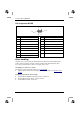
Pin assignment D-SUB
1
5
6
10
11
15
Pin Meaning Pin Meaning
1 Video input red 9 + 5 V
2 Video input green 10 Sync. ground
3 Video input blue 11 Ground
4 Ground 12 DDC-Data
5 DDC ground 13 H. sync
6 Red video ground 14 V. sync
7 Green video ground 15 DDC Clock
8 Blue video ground
Error handling
Should an error occur, first check the following points. If the distortion is still not eliminated, the
monitor should, if possible, be checked on another computer and/or with another data cable.
If you cannot solve the problem, contact our customer service centre.
The display is too small or not centred
The monitor recognises an undefined mode (see "Technical data").
Ê Adjust the position and the size of the display and save your settings (see "Operation of the
monitor").
No display (power indicator does not light)
Ê Check whether the ON/OFF switch on the monitor is switched on.
Ê Check whether the power cable is correctly connected.
Ê Check whether the mains socket is live.