
User guide


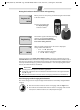


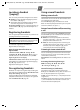

Table Of Contents
- Gigaset A680
- Safety precautions
- Care
- ECO WDCT
- First steps
- Making calls
- Using the directory and lists
- Locating a handset ("paging")
- Registering handsets
- De-registering handsets
- Using several handsets
- Setting the alarm clock
- Phone settings
- Operating the base station on the PABX
- Appendix
- Menu tree

A680 (A380-L2) / PHL-TWN eng / A31008-M2005-Z401-1-7619 / Version 4, / starting.fm / 14.05.2010
4
Connecting the charging cradle (if included)
Setting up the handset for use
The display is protected by a plastic film.
Please remove the protective film!
Inserting the batteries and closing the battery cover
1
2
1
2
¤ Connect the flat plug from
the power supply 1.
¤ Plug the mains adapter into
the plug socket 2.
If you need to disconnect the plug from the charging cradle,
press the release button 1 and disconnect the plug 2.
Warning
Use only the rechargeable batteries recommended by Gigaset Communications GmbH
(¢ page 11). Never use a conventional (non-rechargeable) battery or other battery types
as this could result in significant health risks and personal injury. For example, the batter-
ies could explode. The phone could also malfunction or be damaged as a result of using
batteries that are not of the recommended type.
¤ Insert the batteries the right way
round.
The polarity is indicated in/on
the battery compartment.
¤ First insert the battery cover at the
top a .
¤ Then press the cover b until it
clicks into place.
If you need to open the battery cover, for
instance to replace the batteries, place
y
our fingertip in the cavity on the casing
a
nd pull the battery cover upwards.
a
b