
User guide


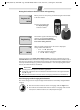



Table Of Contents
- Gigaset A680
- Safety precautions
- Care
- ECO WDCT
- First steps
- Making calls
- Using the directory and lists
- Locating a handset ("paging")
- Registering handsets
- De-registering handsets
- Using several handsets
- Setting the alarm clock
- Phone settings
- Operating the base station on the PABX
- Appendix
- Menu tree

A680 (A380-L2) / PHL-TWN eng / A31008-M2005-Z401-1-7619 / Version 4, / starting.fm / 14.05.2010
6
Setting the date and time
Set the date and time so that the correct date and time can be assigned to incoming calls, and
so that the alarm can be used.
MENU ¢ Settings ¢ OK ¢ Date/Time ¢ OK
¢ Date: ¢ ~ (enter the day, month and year in 6-digit format) ¢ OK
¢ Time: ¢ ~ (enter hours and minutes in 4-digit format) ¢ OK (display message: Saved)
¢ a (press and hold to return to idle status)
Display in idle status
Once the phone is registered and the time set, the idle display
is shown as in this example.
Activating/deactivating the handset
Press and hold the a key to activate or deactivate the handset.
If you place a deactivated handset in the base station or charg-
ing cradle, it will automatically activate.
Your phone is now ready for use.
If you have any questions about using your phone, please read the tips on troubleshooting
("
Questions and answers" ¢ page 12) or contact our Customer Care team page 13.
Please note
◆ After the first battery charge and discharge you may replace your handset in the base
station or charging cradle after every call.
◆ Always repeat the charging and discharging procedure if you remove the batteries
from the handset and reinsert them.
◆ The batteries may warm up during charging. This is not dangerous.
◆ After a while, the charge capacity of the batteries will decrease for technical reasons.
Please note
When entering the time and date, you can move the position of an entry to the left or right
by pressing the control button up or down.
V
11.12. 11:56
INT MENU