
User guide


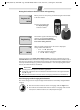



Table Of Contents
- Gigaset A680
- Safety precautions
- Care
- ECO WDCT
- First steps
- Making calls
- Using the directory and lists
- Locating a handset ("paging")
- Registering handsets
- De-registering handsets
- Using several handsets
- Setting the alarm clock
- Phone settings
- Operating the base station on the PABX
- Appendix
- Menu tree

9
A680 (A380-L2) / PHL-TWN eng / A31008-M2005-Z401-1-7619 / main.fm / 14.05.2010
Locating a handset
("paging")
You can locate your handset using the base station.
◆ Briefly press the registration/paging key on the
base station
(¢ page 1).
◆ All handsets will ring simultaneously ("paging"),
even if the ringer tones are deactivated.
End paging: briefly press the register/paging key on
the base station
(¢ page 1) or the talk key c on a
handset.
Registering handsets
You can register up to four handsets on your base sta-
tion (Gigaset A68H) recommended).
For automatic registration of handsets to
Gigaset
A680, see ¢ page 5.
Manual registration of handsets to
Gigaset A680
1. On the handset: MENU ¢ Settings ¢ OK
¢ Handset ¢ OK ¢ Register HS ¢ Enter the sys-
tem PIN of the base station (default is 0000) ¢ OK.
Registering flashes in the display.
2. On the base station: within 60 sec. of entering the
system PIN, press and hold the registration/paging
key
(¢ page 1) (min. 3 sec.).
Registration takes approx. 1 minute.
De-registering handsets
Handsets can only be de-registered by resetting the
base station to its default settings. This will also reset
every other setting
¢ page 10.
If you have only registered handsets for other GAP-
compatible devices, these can only be de-registered
with a hardware reset
¢ page 10.
Using several handsets
Making internal calls
Internal calls are no-cost calls to other handsets that
are registered to the same base.
Press the INT display key. All handsets are called.
When an internal participant answers you can speak
to them. To end the call, press
a.
Internal consultation call/connecting
a call
You are in conversation with an external participant.
Press the
INT key to call all handsets. The external par-
ticipant hears the hold music.
◆ Before the internal participant has answered,
press the end call key
a; the call is diverted to the
participant who answers the call.
◆ After the internal participant has answered, you
can talk to him. Press the end call key
a; the call is
diverted, or press the display key
”; you are
reconnected to the external participant.
Listening in to an external call
You are conducting an external call. An internal par-
ticipant can listen in on this call and take part in the
conversation (conference).
Precondition: The Listening in function must be acti-
vated.
Activating/deactivating listening in
MENU ¢ Settings ¢ OK ¢ Base ¢ OK
¢ Listening in ¢ OK (‰ = on)
Internal listening in (conference)
You want to listen in to an existing external call.
Briefly press and hold the c key. You can listen in to
the call. All participants hear a signal tone.
To end: press the end call key a. All participants hear
a signal tone.
If the first internal participant presses the end call key
a, the handset that has "listened in" remains con-
nected to the external participant.
Please note:
Each additional handset must be registered on the
base station in order for it to work properly!