
Operating instructions

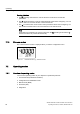



Operating
7.2 Operating modes
SIPART PS2 with and without HART communications
102 Operating Instructions, 09/2008, A5E00074631-08
Diagnostics
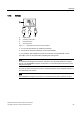
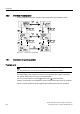
Proceed as follows to call the "Diagnostics" mode from the "Automatic" or "Manual" modes:
1. Press the three buttons of the positioner at the same time for at least 2 seconds.
Current operating data can be called and displayed in this mode, e.g.:
● Stroke number
● Number of changes in direction
● Number of fault messages
Note
The "Automatic" and "Manual" modes remain set when switching to the "Diagnostics"
mode. The positioner responds as per the set mode:
• The predefined setpoint is used as a control variable in the automatic mode.
• The last reached position is retained in the manual mode.
See also
Commissioning (Page 113)
Overview parameters A to P (Page 141)
Overview of diagnostics values (Page 185)
Meaning of diagnostics values (Page 187)