
Operating instructions




Commissioning
9.2 Commissioning linear actuators
SIPART PS2 with and without HART communications
Operating Instructions, 09/2008, A5E00074631-08
121
Setting the actuator
1. Check whether the mechanical unit can be moved freely in the entire actuating range.
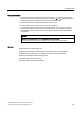
Move the actuator to the respective end position using the
and buttons. Press both
the direction buttons simultaneously to reach the end position faster.
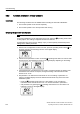
2. Now move the actuator to the horizontal position of the lever.
3. A value between "P48.0" and "P52.0" is shown on the display.
4. If a value beyond this value range is shown on the display, you must move the friction
clutch. Move the friction clutch until a value between "P48.0" and "P52.0" is achieved.
The closer the value is to "P50.0", the more accurate is the stroke travel determined by
the positioner.
NOTICE
The following is applicable for the flameproof enclosure version:
The inner friction clutch is fixed. Therefore, only move the outer friction clutch.
See also
Installing the linear actuator (Page 36)
Installing optional modules in the standa
rd and intrinsically safe version (Page 54)
Installing the optional modules in the "flameproof enclosure" versio
n (Page 56)
External position displacement sensor (Page 51)
Transmission ratio selector (Page 50)
Overview of device components (Page 23)