
Operating instructions




Commissioning
9.2 Commissioning linear actuators
SIPART PS2 with and without HART communications
122 Operating Instructions, 09/2008, A5E00074631-08
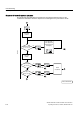
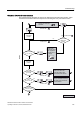
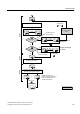
9.2.2 Automatic initialization of linear actuators
Conditions
The following conditions must be fulfilled before activating the automatic initialization:
1. The actuator spindle can be moved completely.
2. The actuator spindle is at a central position after moving.
Initializing the positioner automatically
Note
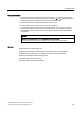
An ongoing initialization can be interrupted at any time. Press the
operating mode button
for this purpose. The settings configured until then are retained.
All parameters are reset to factory settings only if you have explicitly activated the preset
settings in the "PRST" parameter.
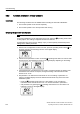
1. Switch to the "Configuration" mode. To do this, press the operating mode buttons for
at least 5 seconds. The following is shown on the digital display:
2. Call the second parameter "YAGL". Press the
operating mode button for a short while
for this purpose. The following is shown on the digital display depending on the setting:
̇
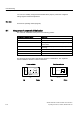
3. Check whether the value displayed in the "YAGL" parameter matches the setting of the
transmission ratio selector. If required, change the setting of the transmission ratio
selector to 33° or 90°.
4. Set parameter 3 to determine the total stroke in mm. The setting of parameter 3 is
optional. The digital display shows the determined total stroke only at the end of the
initialization phase.
– Press the
operating mode button for a short while if you do not want any
information about the total stroke in mm. You are then directed to parameter 4.
– Call parameter 3 by pressing the
operating mode button for a short while. The
following is shown on the digital display: