
Operating instructions



Commissioning
9.3 Commissioning part-turn actuators
SIPART PS2 with and without HART communications
Operating Instructions, 09/2008, A5E00074631-08
127
9.3 Commissioning part-turn actuators
9.3.1 Preparing part-turn actuators for commissioning
NOTICE
Setting of the adjustment angle
The usual adjustment angle for part-turn actuators is 90°. Accordingly set the transmission
ratio selector in the positioner to 90°.
Condition
The following conditions must be fulfilled before activating the initialization:
1. You have installed the positioner for the part-turn actuators using the suitable mounting
kit.
2. You have connected the actuator and the positioner to the pneumatic lines.
3. Pneumatic auxiliary power is supplied to the positioner.
4. The positioner has been connected to a suitable current or voltage source.
Setting the actuator
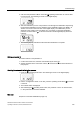
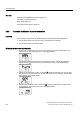
1. The positioner is in the "P manual mode". The current potentiometer voltage P in percent
is shown on the upper line in the digital display. "NOINI" blinks in the lower line of the
display. Examples of corresponding displays are given below:
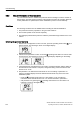
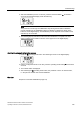
2. Check whether the mechanical unit can be moved freely in the entire actuating range. For
this purpose, move the actuator to the top and the bottom end positions alternately using
the
increment or the decrement buttons.
Note
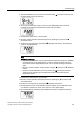
Press the
increment or decrement buttons additionally to reach the end position
faster.
3. After checking, move the actuator to a central position. This accelerates the initialization
process.