
Operating instructions



Commissioning
9.3 Commissioning part-turn actuators
SIPART PS2 with and without HART communications
128 Operating Instructions, 09/2008, A5E00074631-08
See also
External position displacement sensor (Page 51)
Pneumatic connection (Page 94)
Basic device (Page 74)
Transmission ratio selector (Page 50)
9.3.2 Automatic initialization of part-turn actuators
Condition
The following conditions must be fulfilled before activating the automatic initialization:
1. The actuating range of the actuator can be passed through completely.
2. The actuator shaft is at a central position.
Initializing the positioner automatically
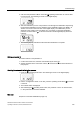
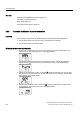
1. Switch to the "Configuration" mode. To do this, press the operating mode button for at
least 5 seconds. The following is shown on the digital display:
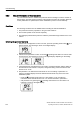
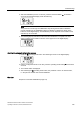
2. Change the actuator type from linear to the part-turn actuator. Change the parameter
setting using the
decrement button. The following is shown on the digital display:
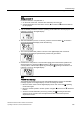
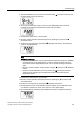
3. Call the second parameter "YAGL". Press the
operating mode button for a short while
for this purpose. This parameter has already been set to 90° automatically. The following
is thus shown on the digital display:
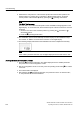
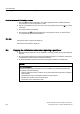
4. Call the fourth parameter "INITA". Press the
operating mode button for a short while
for this purpose. The following is shown on the digital display: