
Operating instructions




Parameterizing/addressing
10.4 Description of parameters
SIPART PS2 with and without HART communications
Operating Instructions, 09/2008, A5E00074631-08
159
10.4.2.20 Description of parameters 51
51.XDIAG - Activation of extended diagnostics
This parameter is used to activate extended diagnostics. At the factory, extended diagnostics
are deactivated. Parameter "51.XDIAG" is set to "OFF". To activate extended diagnostics,
there are three modes available:
● On1: Extended diagnostics are activated. Threshold-3 fault messages will be output over
the fault message output.
● On2: Extended diagnostics are activated. Threshold-2 fault messages will be activated
using alarm output 2. Threshold-3 fault messages will also be output over the fault
message output.
● On3: Extended diagnostics are activated. Threshold-1 fault messages will be activated
using alarm output 1. Threshold-2 fault messages will be activated using alarm output 2.
Threshold-3 fault messages will also be output over the fault message output.
Note
Please note that only after selection of one of the modes "On1" to "On3" will the
parameters of extended diagnostics be shown on the digital display, from "A.
PST" to
"P.
PAVG".
In the factory settings, parameters "A.
PST" through"P. PST" are deactivated by default.
Parameter "51.XDIAG" is set to "OFF". The corresponding parameters are only displayed
after you activate the appropriate menu item with "On".
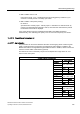
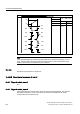
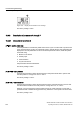
In advanced diagnosis, the threshold of the fault message is displayed using columns in
addition to the error code. These columns are shown on the digital display as follows:
Figure 10-6 Display of a threshold 1 error message
Figure 10-7 Display of a threshold 2 error message