
Operating instructions




Mounting
4.5 Positioners exposed to strong acceleration forces or vibrations
SIPART PS2 with and without HART communications
50 Operating Instructions, 09/2008, A5E00074631-08
4.5.2 Friction clutch
Procedure
NOTICE
The following is applicable for the "flameproof enclosure" version:
• Move only the outer friction clutch. The inner friction clutch is fixed and may not be
moved in case of a flameproof enclosure.
• Do not open the flameproof enclosure of the positioner in explosion-prone atmospheres.
An additional friction clutch is therefore provided at the outer side of the shaft. Only the
outer friction clutch may be moved.
After installing the positioner and commissioning it completely, set the torque of the friction
clutch as follows:
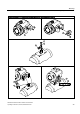
1. Insert a commercially available, approximately 4 mm wide screwdriver in the slit of the
yellow wheel on the module cover.
2. Move the yellow wheel anticlockwise using the screwdriver until it noticeably engages.
This intensifies the torque of the friction clutch.
3. A fixed friction clutch is characterized by an approximately 1 mm wide gap between the
yellow and the black wheels.
4. In order to carry out zero balancing, e.g. after changing the actuator, first reduce the
torque by rotating clockwise up to the end stop of the yellow wheel. After zero balancing,
fix the friction clutch again as described above.
See also
Notes on use (Page 48)
4.5.3 Transmission ratio selector
Procedure
Lock the transmission ratio selector starting from the neutral position (condition at delivery)
as follows:
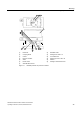
1. Move the yellow wheel below the terminals using a commercially available, approximately
4 mm wide screwdriver anticlockwise or clockwise depending on the 33° or 90° position
that you have selected until it noticeably engages.
2. Note that the transmission ratio selector can now be moved only after unlatching the
anchorage. You must therefore bring the yellow ring back to the neutral position if you
wish to move the transmission ratio selector, e.g. after changing the actuator.
See also
Notes on use (Page 48)