
Operating instructions




Installing option modules
5.1 General information on installing option modules
SIPART PS2 with and without HART communications
Operating Instructions, 09/2008, A5E00074631-08
55
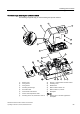
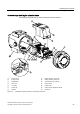
Overview image: installing the optional modules
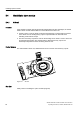
The following image will help you when installing the optional modules:
① Module cover ⑬ SIA unit or mechanical limit switch module
② Fixing screws ⑭ Insulating cover
③ Fixing screws ⑮ Motherboard
④ Actuating disc bearings ⑯ Ribbon cable for alarm unit
⑤ Pneumatic block ⑰ Ribbon cable for I
y
module
⑥ Transmission ratio selector ⑱ Nameplate
⑦ Friction clutch adjustment wheel Sign set
⑧ Actuating disc for A2, terminals 51 and 52 ⑲ Warning sign on the side opposite the
nameplate