
Operating instructions




Installing option modules
5.6 EMC filter module
SIPART PS2 with and without HART communications
68 Operating Instructions, 09/2008, A5E00074631-08
Device features
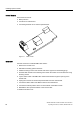
Device features include:
● EMC protection
● Connection to motherboard
● Connecting terminals for an external potentiometer
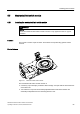
Figure 5-7 EMC module
Installation
Proceed as follows to install the EMC filter module:
1. Remove the module cover.
2. Dismantle all existing optional modules.
3. Unlatch the fixing screws of the module rack that is opposite to the blanking plugs.
4. The EMC filter module has a fastening hole. Fasten the module on the module rack using
the fixing screws.
5. Lay the ribbon cable of the EMC filter module towards left through the opening of the
module rack.
6. Unplug the connector of the internal potentiometer from the motherboard.
7. Connect the ribbon cable of the EMC module to the motherboard.
8. Connect the external position sensor to the terminals of the EMC module.
9. Reinstall the other optional modules in the reverse order.
10. Install the module cover.