
Operating instructions




Connection
6.1 Electrical connection
SIPART PS2 with and without HART communications
92 Operating Instructions, 09/2008, A5E00074631-08
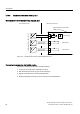
6.1.4.5 Mechanical limit switch module, Ex n
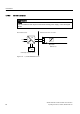
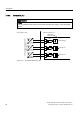
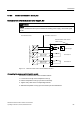
Mechanical limit switch module wiring diagram, Ex n
'&9
1RQKD]DUGRXVDUHD +D]DUGRXVDUHD]RQH
0HFKDQLFDOOLPLWVZLWFKPRGXOH
'5.
(([
)DXOWPHVVDJH
/LPLWYDOXH$
/LPLWYDOXH$
8PD[9'&
,PD[P$
8PD[9'&
,PD[P$
+
+
+
=
=
.
.
6ZLWFKLQJDPSOLILHUWR(1
Figure 6-25 Mechanical limit switch module 6DR4004-6K, Ex n
Connecting the mechanical limit switch module
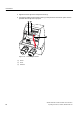
Connect the mechanical limit switch module as follows:
1. Loosen the screw ⑱ on the transparent cover ⑲.
2. Pull the transparent cover ⑲ up to the front end stop.
3. Tighten every cable in the corresponding terminal.
4. Slide the transparent cover ⑲ up to the end stop of the motherboard.