
Operating instructions




Operating
7.1 Operating elements
SIPART PS2 with and without HART communications
Operating Instructions, 09/2008, A5E00074631-08
97
7.1.2 Buttons
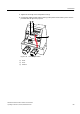
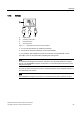
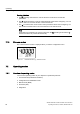
① Digital display
② Operating mode button
③ Decrement button
④ Increment button
Figure 7-1 Digital display and buttons of the positioner
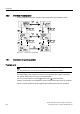
● You can use three buttons to operate the positioner.
● The function of the buttons depends on the mode selected.
● In a positioner with a flameproof enclosure, the buttons are protected with a cover.
The button cover can be opened after unlatching the locking screw.
Note
In positioners with flameproof enclosures, the button cover prevents liquids from seeping
through. The IP66/NEMA 4x degree of protection is not ensured when the enclosure or the
button cover is open.
You have to remove the enclosure cover to operate the buttons of the standard controller or
the "intrinsically safe" version.
Note
The IP66/NEMA 4x degree of protection is not ensured as long as the positioner is open.