
Operating instructions




Operating
7.2 Operating modes
SIPART PS2 with and without HART communications
98 Operating Instructions, 09/2008, A5E00074631-08
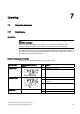
Function of buttons:
● The
operating mode button is used to select the modes and to forward the
parameters.
● The
decrement button is used to select parameter values when configuring. You can
use this button to move the actuator in the manual mode.
● The
increment button is also used to select parameter values when configuring. You
can use the increment button to move the actuator in the manual mode.
Note
Parameters are activated in the reverse order when the
operating mode and the
decrement buttons are pressed simultaneously.
7.1.3 Firmware version
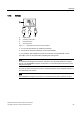
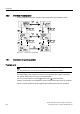
The current firmware version is displayed when you exit the configuration menu.
Figure 7-2 Firmware version, e.g. Version 4.00.00
7.2 Operating modes
7.2.1 Overview of operating modes
You have five operating modes at your disposal to operate the positioner:
1. P-manual mode (as-delivered condition)
2. Configuration and initialization mode
3. Manual mode (MAN)
4. Automatic (AUT)
5. Diagnostics