
User Manual

4422-954-85011_582-Trulifi Controller 6800 Controller User Manual
Pre-requisites for using the LiFi controller and SNMP
functionality:
• Advanced Networking knowledge
• System/Network administrator rights
• SNMP application like eg. SolarWinds, MIB Browser
etc.
• Licensed system
This document describes the Controller Application,
Roaming and SNMP configuration. This document is
intended for IT professionals responsible for installation
and management of enterprise IT systems and assumes
Network Management and configuration knowledge.
Hardware installation
The mechanical and electrical installation of the
Controller Unit is described in the Quick Start guide
packed with the Trulifi Controller Unit, please refer to this
document.
The LAN wiring of the Controller Unit is described in the
Installation Instructions included with the Trulifi 6002
system.
Once you have completed the mechanical, electrical and
LAN installation steps, please proceed with this manual. In
the remainder of this document we describe the
configuration of the controller. The LiFi controller
application is pre-installed on the controller hardware,
however still requires to be licensed.
A maximum of 16 Access Points can be connected to 1
Trulifi 6800 Controller Unit. If more LiFi Access points
need to be controlled, please add a LiFi controller or
switch over to the Virtual Machine version (Trulifi 6800
Controller Application).
Trulif i C ontroller Application
(Virtual Machine)
The LiFi controller application runs on VM-ware version 15
or higher.
Minimum hardware requirements:
≤ 16 AP’s
≤ 64 AP’s
Minimum number
of virtual CPUs
2
(≥ 3,2 GHz)
x86 platform
4
(≥ 3,2 GHz)
x86 platform
Min. RAM
4Gb
8Gb
Min. storage
8Gb
8Gb
NIC
1Gbps
1Gbps
Other
Client PC
Client PC
Purchase and activate licenses
In case you would like to extend the LiFi-controller
system with additional licenses, please contact your local
Signify reseller or representative or
customercare.trulifi@signify.com
Installation instruction Virtual Machine
version and Trulifi Controller Application 6800
Step 1 : Save the
trulifi_controller_application
ovf-file on
your client.
Step 2 : Open the VM application on your client.
Step 3 : Open the
trulifi_controller_application
ovf-file
in your virtual machine.
Step 4 : Import “
trulifi_controller_application
” on your
client.
Step 5 : Start your virtual machine application
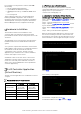
When the virtual machine application is started, you will
first see the following screen. This can be used in case
the password of the Trulifi controller application is lost or
if the Trulifi 6800 Controller application requires a reset.
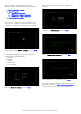
Wait for the following screen to appear:
Select
Next
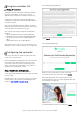
The following screen appears:
For Automatic configuration select
Yes
For Manual Installation Select
No
and select
Next