
User Manual

4422-954-85011_582-Trulifi Controller 6800 Controller User Manual
Advanced configuration
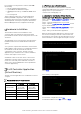
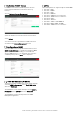
Controller status
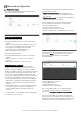
The controller status page provides information about
the controller and the LiFi domain.
Controller status information
The Controller text field can be:
• Detecting: Network internet connection detection is
ongoing.
• Offline: Something went wrong during the start-up of
the controller. An additional pop-up message on the
bottom side screen will give the user further
information (e.g.: no network detected, ….).
• Online: Everything is up and running.
The Internet text field can be:
• Detecting: Network internet connection detection is
ongoing.
• Offline: Controller is not connected to a network
backbone.
• Online: Network backbone connection found.
LiFi domain devices information
The controller manages one or more LiFi domains.
Domains consists of one access point and one or more
USB keys. To allow for USB Keys to connect to multiple
domains, all domains must be protected with the same LiFi
encryption password. This password must be the same
for every access point and USB key in the domain. Any
access point or USB key that does not have the same LiFi
encryption password will be rejected from the domain.
• Access Points without the correct password will not be
authorized to communicate with a USB key, even with
USB keys configured with the same password as the
controller
• USB keys without the correct password will not be able
to connect to any access points, even with access
points configured with the same password as the
controller.
It is not possible to create separate VLAN’s managed by
one controller or Access Point.
The following text fields indicate the number of devices
associated to the domain:
•
Access Points Connected
text field indicates the
number of access points connected and associated to
the controller.
•
USB Keys Connected
text field indicates the number of
USB keys connected to the domain.
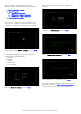
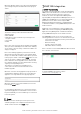
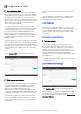
Further details per access point can be found in the
Access Points table at the bottom of status page:
• Access point MAC address
• Access point platform revision
• Firmware version of the Access point
• Number of USB keys associated with the access point
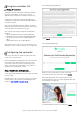
If at least one USB key is attached to the access point, a
green button
Show
can be clicked to open an extra
window giving further details for every USB key
associated with it:
For every USB key, you can find:
• USB key MAC address
• USB key platform revision
• Firmware version of the USB key
Note: every USB key that is not configured with the
correct LiFi encryption password is detected and
reported as:
Encryption password might not match
.
The access point table is not refreshed automatically.
Please click the refresh button of your web browser to
update the information. Use the Roaming overview page
to track the devices in the LiFi domain in real-time.