
User Manual

4422-954-85011_582-Trulifi Controller 6800 Controller User Manual
Roaming overview
Roaming allows the system operator to configure larger
LiFi systems and have users roam from one domain
(Access Point) to another domain. Roaming requires a
license and is only available on the Trulifi 6002.2 Access
Point.
6.2.1 Activation of ROAMING license
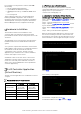
If a ROAMING license has been obtained please save this
license key file
xxxxxxxx.lic
in a known location, eg.
Desktop.
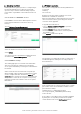
Choose
System > License Management
Select the xxxxxx.lic license file from the saved location.
Select
Upload
Once the license file is uploaded the available functions
are visible in the
License Management
screen.
6.2.2 ROAMING settings
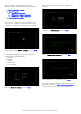
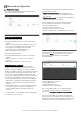
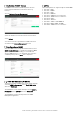
The roaming page gives an overview of the LiFi domain
devices in real-time. The roaming screen shows the
access points and USB keys currently associated with the
LiFi domain.
A filter can be used to select which access points you
want to display. A drop-down list and two buttons can be
used to configure this filter. The buttons
clear all
and
select all
allow to quickly select/unselect the full list. It is
also possible to select the access points one by one by
ticking the checkbox associated to each access point’s
MAC address.
Firmware upgrades
The controller can upgrade the following Trulifi devices:
• Controller
• USB key
• Access Point
Registered customers will be notified in case a new
firmware file is available for download.
After the new firmware is downloaded and stored on the
client on a known location (eg. Desktop) files the LiFi
controller can be upgraded .
To upgrade the Trulifi devices:
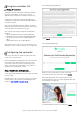
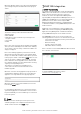
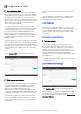
• Choose
System > Firmware Upgrade
to open the
firmware update page.
•
Click the
Browse
button, a file section appears.
•
In the File Name to Install text box, enter the path to
the firmware (*.zip)
•
Click
Upload
to launch the upload.
The upload process might take several seconds before a
new window appears showing the versioning status for
the Trulifi devices.
In this new window, the current and new version columns
give a status of the current firmware/software version
per Trulifi device family:
• USB Key (6002_1_USB-P platform name)
• Access point (6002_2-MODEM-P platform name)
• LiFi controller
It is possible to select which device should be upgraded
by ticking the corresponding checkbox in the update
column and then click on the
start upgrade
button.