
User Manual

4422-954-85011_582-Trulifi Controller 6800 Controller User Manual
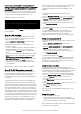
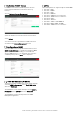
Activation of SNMP license
If a SNMP license has been obtained please save this
license key file
xxxxxxxx.lic
in a known location, eg.
Desktop.
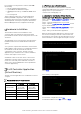
Choose
System > License Management
Select the xxxxxx.lic license file from the saved location.
Select
Upload
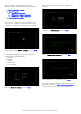
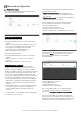
Once the license file is uploaded the available functions
are visible in the
License Management
screen.
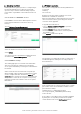
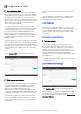
Configuration of SNMP
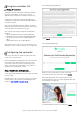
After the SNMP license is uploaded and activated, select
SNMP > Basic Settings
to configure the mandatory MIB-II
system parameters. Additionally, you can enable the
specific SNMP Version 1 or 2c and define the respective
community string. Choose
Save
after completion.
Trulifi MIB Guide and LiFi MIB file
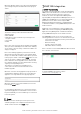
The full functionality and MIB Guide can be downloaded by
selecting
SNMP > Documents
. Select
Trulifi MIB-Guide
and select
Download
.
The LiFi MIB file can be downloaded by selecting
SNMP >
Documents
. Select
LiFi MIB
and select
Download
.
The LiFi MIB file can then be imported in the SNMP
Management application
RFC’s
This following RFCs are supported by the Trulifi SNMP :
• RFC 1155 - SMIv1
• RFC 1157 - SNMPv1
• RFC 1212 - SMIv1
• RFC 1901 - SNMPv2c
• RFC 1908 - SNMP Version Coexistence
• RFC 2576 - SNMP Version Coexistence
• RFC 2578 - SMIv2
• RFC 2579 - SMIv2 TC
• RFC 2580 - SMIv2 CONFORMANCE
• RFC 3418 - MIB-II (SNMP, SYSTEM)
• RFC 3584 - SNMP Version Coexistence