
Installation guide



13
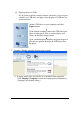
(2) Export playlist via USB
If you prefer to update contents without a network, you can export
contents to a USB drive and plug it into the player’s USB port for
synchronization.
5. Looping / Weekly schedule/ display interval setup
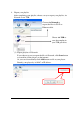
(1) Looping mode plays several files in a specified order repeatedly.
Click Looping-> Looping to make the content played continuously.
(Looping is the default setting.)
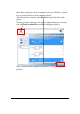
Attach a USB drive to your computer and click
Export button
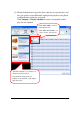
Upon transfer complete, remove the USB drive and
insert it in the player. The on-screen display will
show you the file(s) being copied
Upon synchronization complete, the player begins to
play the new playlist Remove the USB drive from
the player