
Installation guide



19
7. Add a ticker
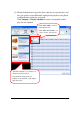
Users can follow the steps to add a ticker bar to the display.
(1) Select a display layout with a ticker.
(2) Save the content in ticker in a text file.
(3) Select the ticker window, the selected section will be marked as color
yellow.
(4) Click Add button to select the text file.
(5) We can also change the background color by clicking Option button.
8. Software Updates
Update software to enhance features and reliability for player systems.
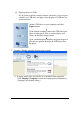
Check if there’s program updates on the internet. Or you can also
manually search for an update from the Help menu.