
Installation guide

8
Software Operation
Signage Manager Express software provides an easy way to let users to export
various media files to the display. Follow the following steps to do the display
settings:
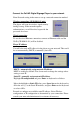
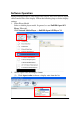
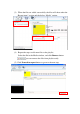
1. Select Player Model
Select a suitable player model. In general, we use Full HD Open API
Player V2 model.
Click Network Media Player -> Full HD Open API Player V2
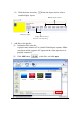
2. Choose aspect ratio and display format
(1) Click Aspect ratio to choose a display ratio from the list.