
Manual

6
Hardware Installation
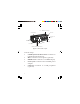
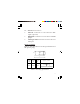
1. Power off all devices you plan to connect to
the Switch.
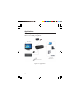
2. Connect an HDMI monitor/display to the
Switch's HDMI Output connector using an
HDMI cable (cable not included).
3. Connect a USB keyboard and USB mouse
to the dedicated USB keyboard and mouse
ports on the Switch.
4. Connect the computer's HDMI output to
the Switch's HDMI Input 1 connector using
the included HDMI cable.
5. Connect the computer's USB Type-A port
to the switch's USB Type-B port associated
with the HDMI Input 1 connector from
step 4 using the included USB cable.
6. Connect the computer's microphone
connector to the Switch's MIC IN port
associated with the HDMI Input 1 connector
from step 4 using the included 3.5mm
mini-jack audio cable. This connection is
optional and only needed if you plan to use
a microphone.