
User`s guide


CP2112-EK
Rev. 0.3 7
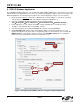
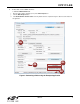
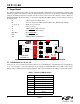
8. To write data over the SMBus interface:
a. Click the Data Transfer tab.
i. Enter the Slave address and data (in hex) in the Write Request box.
j. Click the Write Request button.
k. Click Get Read/Write Transfer Status and verify that the transfer completed using the status bar at the bottom of
the application.
Figure 6. Performing a Write using the Example Application
8a
8d
8b
8c