
Technical data


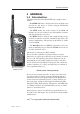



On/Off (1)
Press to turn the HT50 on. To turn the radio off, press and
hold the key for approximately 2 seconds. This is to avoid acci-
dental power off.
Hi/Lo (2)
Toggles between high and low transmit power (see specification
section 3.9). Use the low setting over short ranges to preserve
battery power.
VOL – Volume (4) & SQ – Squelch (5)
Press to select Volume or Squelch mode then use the ▲ and ▼
keys to adjust the level.
The display shows “VOL” or “SQL” for 3 seconds – if ▲ or ▼
are not pressed within this time, their function reverts to channel
select.
▲ / ▼ (6 & 7)
These keys will change the selected channel. Pressing VOL,
SQ, or , then
▲ or ▼ within 3 seconds will adjust the volume,
squelch, or backlighting level respectively. The bargraph will
indicate the level selected.
SCAN mode (8)
Scans through the channels stored in the channel memory (dis-
play shows “MEM SCAN”).
• Select channel and press twice to add to or delete from
Memory Scan (display shows “ENT” or “DEL” respectively).
HT50/HT51/HT53 & Axis 50 GMDSS
10
E03766 Issue 3.0
a
b
c
d
f
g
i
e
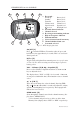
Fig 2.2 - HT50 display functions
a Bar graph –
Power up Battery level
Standby Battery level
Transmit Battery level
Volume mode Volume level
Squelch mode Squelch level
pressed Backlight level
b Personal channel indicator
c Channel selected
d Receiving or transmitting indicator
e High or Low power indicator
f Function indicator
g Selected channel stored in memory
h Channel inhibited from scan
i Scan mode selected
h