
Technical data




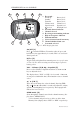

Hold
during
Power Up
Select secondary
channel set*
Disable / enable
first key beep
*If available
Press & hold
Triple
Beep
Inhibit / enable
selected channel
from scan
Set Personal
channel
Instruction Manual
9
E03766 Issue 3.0
Pressing and holding certain keys will access additional func-
tions. These are indicated by a double beep, or a triple beep if
held for longer (Table 1).
Key
VOL
SQ
▲
▼
SCAN
D/W
16
Hi/Lo
Press
1x
Select Volume mode
Select Squelch mode
Standard mode
Channel Up / Down
Volume mode
Volume Up / Down
Squelch mode
Squelch Up / Down
Light mode
Light level Up / Down
Memory Scan
Dual Watch
Select channel 16
Select Light mode
Backlight On/Off
Select 1 or 5 Watts
Press
2x
Add / delete
channel from
Memory Scan
Press & hold
Double
Beep
Scan All Channels
Tri-Watch
Select Personal
channel
Engage / disable
keypad lock
Table 1 - Additional functions, overview