
User's Manual



1-5
Preparation for Machine Operation
1
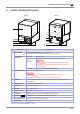
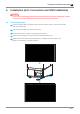
3. Understanding the parts
1
9
1010
5
6
7
8
2
3
4
[ Front ] [ Rear ]
11
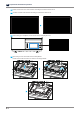
No. Part Name Description
1
Power Button
Press this button shortly to turn on printer.
Press and hold for more than 2 seconds to turn off the printer.
Power Button
Indicator
Lamp ON Power is ON
1 second
interval
flickering
Can be turned on instantly (power cable is connected)
Caution
-
In case of not using the printer for long time, please unplug
the power cord.
-
The lamp may flicker for a few seconds after power cord is
disconnected.
Lamp OFF Inactive Mode (power cord is unplugged)
2 LCD Control Panel
Screen used to control printer.
Caution
-
Usage of printer is recommended after removing the protection film on
LCD control panel.
If the film is not removed, the touch screen may not work properly.
3 USB Slot
Connect USB flash drive containing printing information and print directly from
USB flash drive.
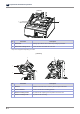
4 Orange Cover
Access to the operating area
5 Power Port
Power cord connector
6 Speaker
※
Play warning sound.
7 Ventilator Fan
Discharges heat from interior
8 LAN Port
Allows a device to connect to a network using a LAN cable.
9
USB Port
Used to connect printer to computer with a USB cable.
10 Carrying Handles
Handles to use when moving the printer
11 Power Switch
Turns the power on or off.
※
May not be supported depending on model.