
User's Manual




1-9
Preparation for Machine Operation
1
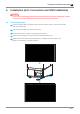
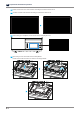
Release two platform locking knobs from machine, attach the platform as shown below, tighten the locking knobs
firmly, and attach the platform cover to the platform.
9
Connection to PC
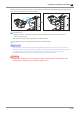
①Direct Connection : Connects one end of the enclosed USB cable to the back of the device and
the other end to the PC.
②Network Connection : Refer to “Network of 2.UI Menu Function”
10
Plug USB flash drive in, and install machine drivers and Slicer program.
Reference
-
This device has been shipped out after performing platform leveling in the factory. However, to prevent
print failure and to maintain the best printing quality, it is recommended to perform platform leveling process
once again in case of setting up the device very first time or moving the device to another place.
For details of platform leveling, refer to “Platform Leveling of 2.UI Menu Function”
Caution
-
Please attach the platform cover to the platform. When using the machine, the main drive of the
machine may be damaged by not installing the platform cover.