
User's Manual





2-17
UI Menu Function
2
7
The platform moves down. When the screen indicates that the lowering is complete, press
[Next]
.
8
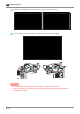
When the platform lowering is complete, fasten back the six platform locking screws using a T-handle hexagon
wrench, and press [Next]
Lock the platform locking screws in the following order: ① front side → ② left side → ③ right side.
② Left side ① Front side
③ Right side
Important
-
Make sure to lock the platform locking screws in the specified order.
-
If the platform locking screws are not locked in the specified order, the platform leveling may fail,
resulting in failed printing.