
User's Manual

Chapter 2. Installing and Set Up
2-1
This chapter explains the unpacking and set up of the printer.
Before proceeding to this chapter, please make sure to read Chapter 1. Important Safety
Instruction.
Unpacking and Checking the Accessories
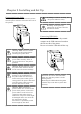
1. Open the box and remove the box containing the accessories and protection materials.
2. Take out the printer by holding bottom of the pri
nter.
3.
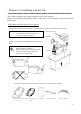
Take out the accessories from the accessory box and check the contents.
Ribbon Cas s ette
( Col or)
Ribbon Cas s ette
( SP)
Dust Box
Cleaning Roller Pow er Cable
Attention:
Keep the packaging materials.
The
box and protection materials are
necessary when movin
g or
Caution:
This printer weighs about
20
Kg.
Please handle it carefully.
When lifting the printer, always hold
bottom of printer. Otherwise, the
printer may be damaged.
Printer
Accessories box
Cushion