
User's Manual

Chapter 2. Installing and Set Up
2-2
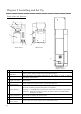
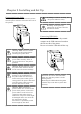
Parts Name and Function
(
Front View
) (
Rear View
)
(Upper View)
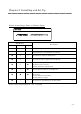
№
Name Function
①
Printer Status
Indicator
Printer status display lamps are located on the panel.
②
Upper Unit
Open the
upper
unit when replacing an ink ribbon or
card
, or when
performing maintenance.
③
Card set unit
Open the card set unit when
card set
ting
,
or when performing
maintenance.
④
Card set unit
open button
When open the card set unit, push this button.
⑤
Power Switch
This switch turns on/off the power of the printer. When the “|” marked
side of the switch is pressed, the power is turned on.
When the “○” marked side of the switch is pressed, the power is turned off.
<Caution> Once the printer is turned off, wait at least 3 seconds before
turning it on again.
⑥
Power Connector
To be used to connect the power cable.
⑦
USB Connector To be used to connect the USB cable.
⑧
Upper Unit
Open Lever
When open the open guide unit, hold this lever.
①
②
③
④ ⑥ ⑤
⑦
⑧