
User's Manual
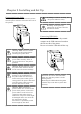

Chapter 2. Installing and Set Up
2-3
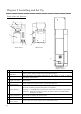
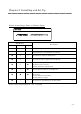
Printer Status Lamps Name and Printer Status
LED Display
Description
POWER MEDIA ERROR
○ ○ ○
The power of printer is off.
* ○ ○
The printer is initializing after turn on the power
Thermal head is cooled/heated on printing.
● ○ ○
The printer is ready to make prints.
● ○ *
The card set unit or upper unit are opened.
● ○ ●
Card jammed in printer.
Mechanical part is faulty.
Trouble of printer control board.
● * ●
The ink ribbon loaded is not supported.
● ● ●
Card
is not set.
Out of card.
The ink ribbon is not loaded.
The ink ribbon is empty.
● * ○
The printer is initializing for the ink ribbon.
Printer status lamp display ●:on, ○:off, *:flashing