
A350 - Troubleshooting-Guide


24
|
Hardware
Laser
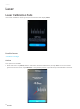
Laser Calibration Fails
If the Laser Calibration doesn't go well, the Touchscreenwill displayFailed.
Possible Causes
• The laser is too high.
Actions
Two options are available.
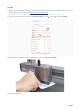
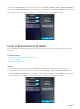
1. Redo auto focus.TapFailed, slide the scaleleft to select the leftmostline, and tapSave.The screen should
go back to themain menu. TapCalibration. If the problem persists, repeat the steps until calibration succeeds.