
A350 - Troubleshooting-Guide


|
25
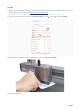
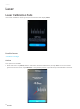
2. Change theLaser Height manually.On the Touchscreen, tapFailed>Settings > Laser > Adjust Laser Height.
Set theLaser Heightto23.0mmand then recalibrate.If the Touchscreen keeps showing Failed, andseveral lines
fail to beburned, then lower the laser height(to21.5 mmor 19 mm, for example), and try again.
LaserIs Discontinuous Or Weak
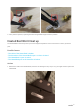
The LaserModule emits weak light and doesn't engrave at its full power, and therefore the module can't finish
AutoFocus.
Possible Causes
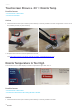
• The Enclosure's door is open during AutoFocus.
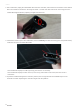
• The laser is too high.
• The Laser Module is broken.
Actions
1. Either close the Enclosure's doors or go to Enclosure > Settings to disable the door detection feature.
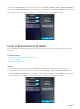
2. Change theLaser height manually.On the Touchscreen, tapSettings > Laser > Adjust Laser Height. Set
theLaser Heightto23.0mmand then recalibrate.If the Touchscreen keeps showing Failed, andseveral lines
won't beburnt out, lower the laser height(to21.5 mmor 19 mm, for example), and try again.