
A350 - Troubleshooting-Guide

|
33
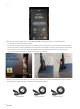
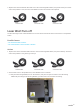
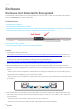
2. Replace the current toolhead cable with one of the interchangeable cables (see picture below).See if this
solves the problem. If not,then the Laser Module is broken andneeds to be replaced.
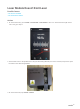
Laser Won't Turn off
The blue laser light of the Laser Module turnson and can't be turned off via the Touchscreen or Snapmaker
Luabn.
Possible Causes
• The Toolhead cableis broken.
• The Laser Module or the Controller is broken.
Actions
1. Replace the current Toolhead cable with one of the interchangeable cables (see picture below).See if this
solves the problem. If not, please go to step 2.
2. Find out which one is the problem first,Laser Module or the Controller.
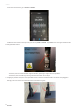
2.1 Get your 3D Printing Module, turn on the machine, and press to open the latchon the 3D Printing
Module.By checking the 3D Printing Module, you will know if the Controller is working.
Z Conversion Cable
Z Conversion Cable
Y Conversion Cable
Y Conversion Cable
Toolhead Cable
Toolhead Cable